It's time to move your marketing claims off spreadsheets when copies multiply, evidence sits in folders nobody can match to the wording, and sign-offs live in email. Excel, Google Sheets, SharePoint and Notion can all keep version history, and some can approve files. What you build and police yourself is the link between each claim, its evidence and its sign-off, market by market.
Picture this (a made-up brand). You're the one marketer at a growing skincare company, and your reviewer is a lawyer who also handles contracts. On a Tuesday, a retailer's buyer asks for the evidence behind "hydrates for 24 hours". You open Claims_Register_v9_FINAL.xlsx. The row says Approved. The evidence column says "see SharePoint > Testing > 2025", and that folder holds three reports.
Which one did your lawyer read? Was it before the formula changed? Was the line cleared for the US too, or only here? The answer's probably in an email from last spring. For a lot of small teams, that's the week the spreadsheet stops being enough.
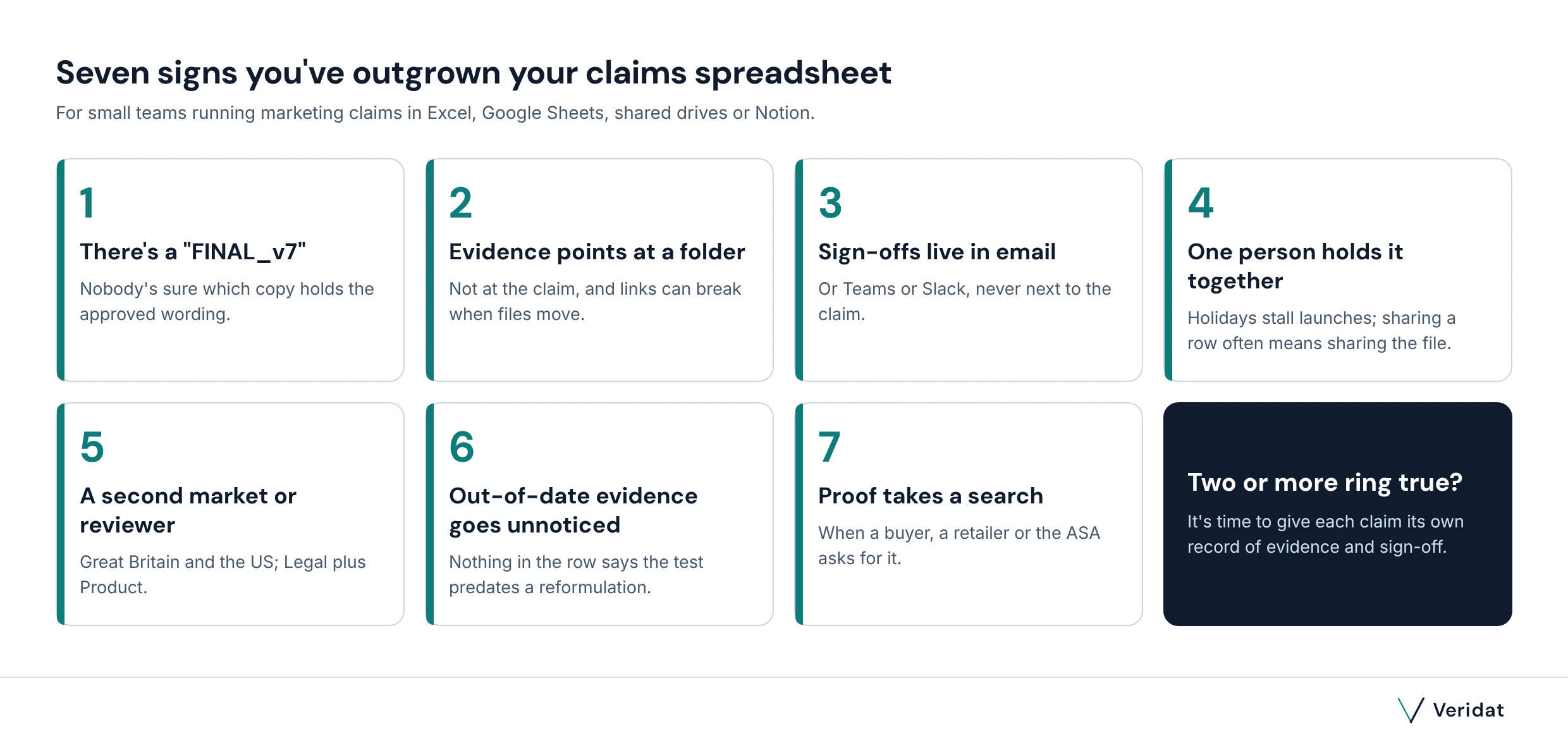
Seven signs you've outgrown your claims spreadsheet
A claims register spreadsheet is a sensible place to start. Trouble begins when the register becomes the thing people argue about, rather than the single source of truth.
1. There's a "FINAL_v7" and nobody's sure which wording was approved
Copies multiply. Even the government's own spreadsheet guidance says to clearly label each version, "especially" for business critical spreadsheets, "for example those shared with a regulator". If two copies disagree, neither is your record.
2. Evidence links point at a folder, not at the claim
"See Testing > 2025" tells you where to start looking, not which report backs which line. And links can break quietly when someone tidies the drive.
3. Sign-offs live in email, Teams or Slack
Your reviewer said yes in a thread. The sheet says Approved. Nothing connects the two.
4. One person holds it together
If only you know how the tabs work, every holiday stalls a launch. And a spreadsheet is shared as a whole file, so giving a colleague access to one row usually means giving them the whole register.
5. A second market or a second reviewer arrives
Selling in the US as well as Great Britain, or adding Product to Legal as a reviewer, multiplies the columns. Each claim now needs a yes per market, from the right people.
6. You can't tell which approved claims rest on out-of-date evidence
A test from before a reformulation still sits behind a live claim, and nothing in the row says so. Unless someone checks a review date column, the sheet can't warn you.
7. A buyer, a retailer or the ASA asks for proof, and it takes a search
Retailers ask on their own timetable, and so does the ASA. Under CAP Code rule 1.7, an unreasonable delay in responding to its enquiries will normally count as a breach in itself. If finding the proof means an afternoon in shared drives, you've outgrown the setup.
Pro tip: Count the claims before you count the tools. Paste your best-selling product page into our free claim checker and see how many lines count as claims. Multiply by your range, and you've got a rough size for your register.
What Excel, Sheets, SharePoint and Notion already do well
Starting in the tools you already pay for makes sense, and for a handful of claims they can carry you a long way. Here's what each gives you, and what's left for you to set up.
| Tool | What it gives you for marketing claims today | What you build or police yourself |
|---|---|---|
| Excel on OneDrive or SharePoint | Version history for files stored in OneDrive or SharePoint (the last 25 versions on a personal account) | Which version was approved, and a sign-off record per claim and market |
| Google Sheets | Version history, up to 15 named versions per spreadsheet, cell edit history and protected ranges | Some changes might not show in cell history; restoring an old version clears it |
| Google Drive approvals | Send a file to reviewers for approval, lock it during review and choose whether edits reset approvals | It approves the whole file; once approved, anyone with edit access can take the lock off and edit |
| SharePoint libraries | Content approval before items become visible, and versioning that shows who changed what, and when | The link from each claim to its evidence; older versions are deleted once a set limit is reached |
| Microsoft Teams Approvals | Approval requests with an approver order, one hub for sent and received requests, and audit events in Microsoft Purview | Needs a Power Automate, Microsoft 365 or Dynamics 365 licence; the record sits apart from the claim and its evidence |
| Notion | A claims database with links to evidence, page lock, row-level access and page verification with an end date | The approval step and its record; page history lasts 7 to 90 days, depending on plan (longer on Enterprise) |
Version history is there, with limits worth knowing
In Google Sheets, revisions "may occasionally be merged" and some cell changes "might not show up in the edit history". Excel's version history only works for files stored in OneDrive or SharePoint.
SharePoint versioning is on by default for new libraries in Microsoft 365 and saves the last 500 versions of a document. Notion keeps page history for 7 days on Free, 30 on Plus and 90 on Business, and says it "won't capture every single change".
File approvals exist, on the right plan
Google Drive approvals let you send a file to reviewers, lock it during review, and choose whether "edits reset all approvals". It's on some Google Workspace plans, not personal Gmail accounts, so check yours. In SharePoint, content approval keeps a new file Pending until someone with Manage Lists permission approves it: a simple SharePoint approval workflow for evidence files.
The Microsoft Teams Approvals app lets you set the approval order and see everything you've sent or received, including requests from Power Automate and SharePoint. It needs a Power Automate, Microsoft 365 or Dynamics 365 licence.
Pro tip: Staying put for now? Switch on the safeguards. Name the approved version in Sheets, tick "Require all approvers to review the same content" in Drive approvals, lock approved pages in Notion, and stop editors resharing the register. In Sheets, you can protect ranges so the approved column can't be overtyped.
Where spreadsheets and shared folders stop working for marketing claims
None of these tools was built around a marketing claim, so the parts that matter most are the parts you design yourself. That's as true of claims governance in Notion as of a shared Excel file. Four gaps keep coming up, and they map onto what marketing compliance asks of each claim.
Evidence tied to the exact wording
Under CAP Code rule 3.7, before you distribute an ad or submit it for publication, you must hold documentary evidence for any claim consumers are likely to see as objective and that can be objectively substantiated. A folder link isn't proof that this test supports this wording, for this product, in this market.
Keeping claim evidence in SharePoint folders or Drive is fine. But no sheet or database can judge whether the file fits the line. That judgement is yours to record, claim by claim, and it's the column most registers leave blank.
Sign-off per market
File approvals approve a file. A register holds dozens of claims, each with its own markets and channels, so approving the whole spreadsheet signs every row at once. An approved claims spreadsheet with per-market columns can work, but you design it, and someone has to keep it honest.
An approval record nobody can quietly change
In Google Drive, once a file is approved and locked, anyone with edit access can take the lock off and make new edits. In Notion, anyone with full or edit access can turn page lock off. In SharePoint, adding a version past the limit deletes the oldest one. Sensible defaults for working files, less so as an audit trail for a claim someone challenges a year later.
Teams Approvals keeps completed requests and logs audit events in Microsoft Purview. But that record lives in the approvals hub, apart from the claim's wording and evidence. We set out what a record that holds up looks like in our guide to the marketing approval process.
Expiry and reuse
Nothing in a sheet tells you a claim's evidence has lapsed unless someone builds a date column and checks it. Notion's page verification, with an end date and a notice to the owner when it expires, is the nearest built-in feature, on its Business and Enterprise plans. Meanwhile approved wording gets copied into decks and drifts, which is the job of an approved claims library.
What it costs compared with a spreadsheet
If you're weighing a spreadsheet alternative for approvals, the honest starting point is that the spreadsheet isn't always free either. Drive approvals are only on some Workspace plans, Teams Approvals needs one of the licences above, and Notion's page verification and longer history sit on its higher plans.
Our Essentials plan is £149 a month, or £1,490 a year, for up to 3 users and 250 claims. It's made for a marketer and a reviewer ready to leave the spreadsheet behind. Viewers, such as your sales team, cost nothing, with no limit on numbers. You can try every feature free for 14 days, with no card needed, and compare all of Veridat's plans.
If someone above you needs the numbers, our template helps you build the business case with your own figures, and these are the questions to ask before you buy.
How to move marketing claims off spreadsheets in five steps
However you do it, the order matters more than the tool. Clean first, move only what's live, and pick one day after which the old file stops being the record.
1. Find every place claims live
Check the spreadsheets and decks, the shared folders and Notion, and the email threads. Pull claims from live packs and product pages too; the checker above shows which lines count.
2. Clean it before you move it
One row per claim, and one ID per claim. Merge near-duplicates ("lasts 12 hours" and "12-hour protection" are one claim with two wordings), and put product and market in columns of their own (channels too). Our evidence-backed claims template is a good column guide.
3. Decide what moves and what stays
Live and planned claims move. Retired claims and closed history stay in the old file, which becomes your read-only archive.
4. Import, then reattach the evidence
In Veridat, you bring the cleaned file in by CSV import, then attach evidence to each claim rather than to a folder. Anything with missing proof shows as missing, not quietly approved, and duplicate claim detection helps catch what cleaning missed.
5. Pick one cutover date
From that day, new claims go only into the new record. Make the old sheet view-only: in Google, change editors to viewers in sharing settings; in SharePoint, change the library's permissions so people get Read access. Email becomes the nudge that something's ready, not the place the decision lives.
Pro tip: Start with the claims on live packs and your best-selling product pages. They carry the most risk, and they're the ones your team will reach for most often.
What to keep in your spreadsheets, Drive and Notion
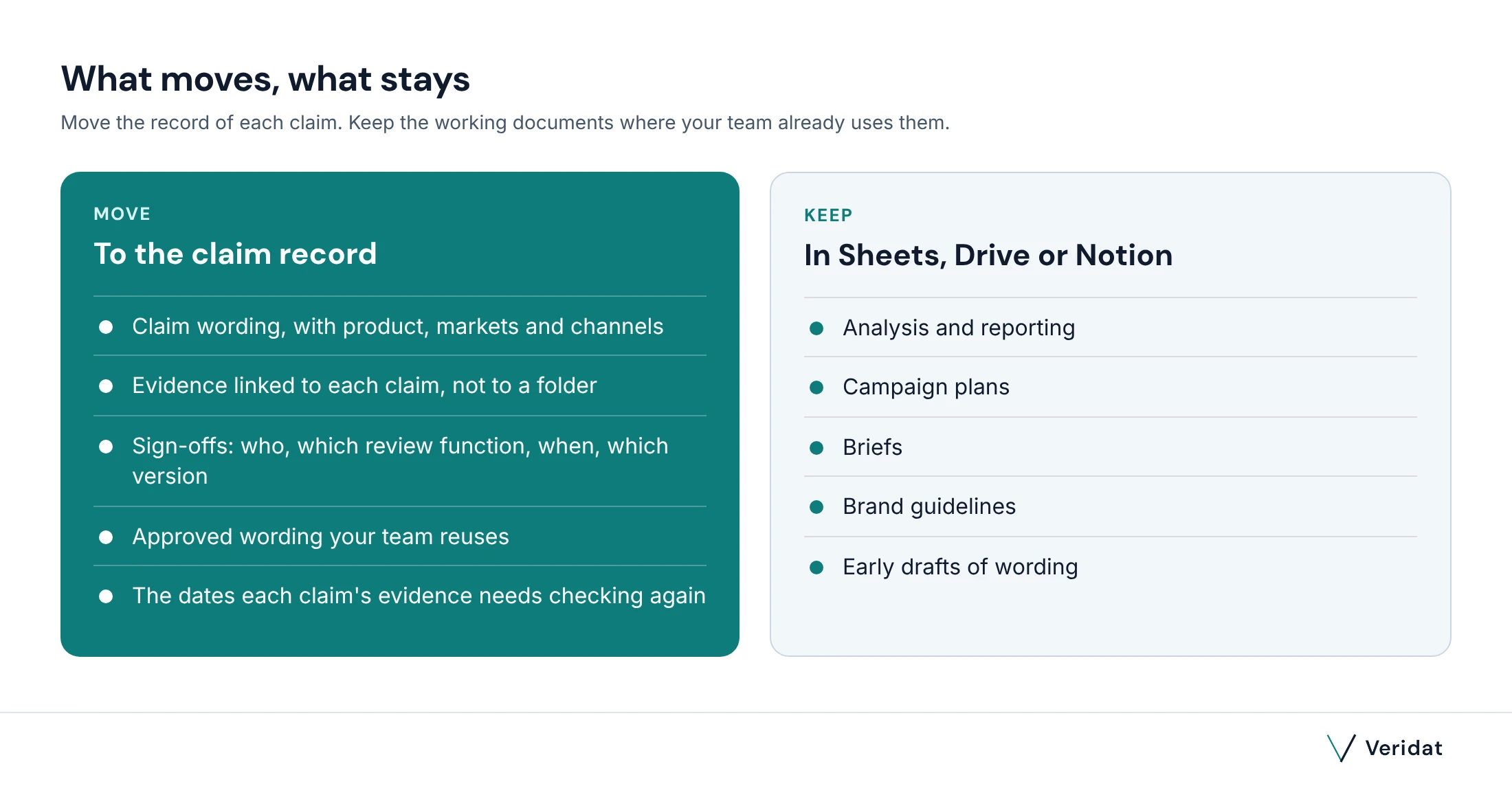
Moving claims doesn't mean moving everything. Analysis and campaign plans are happy where they are. So are the brief, the brand book and early drafts of wording. What moves is the record: the approved wording, the evidence linked to each claim, the sign-offs and the dates the evidence needs checking again.
How Veridat works for a marketer and a reviewer
We built Veridat to give marketing, product, technical, compliance and legal teams one place to validate marketing and product claims. You add the claim: its wording, product, markets and channels. Veridat builds a checklist from 26 UK and US advertising rules, works out the substantiation needed, turns each gap into a task with a due date and chases it with reminder emails. Then it sends the claim to the right reviewers.
Nothing is approved until reviewers have reviewed and accepted the evidence. A gap can only go through as "approved with conditions", with the reason recorded, and a reviewer can also return a claim for changes. Each market is signed off separately, so wording can be approved for Great Britain while the US is still in review.
Every sign-off records who decided, their review function, when and on which version, and it can't be edited afterwards. Change approved wording and it becomes a new version with its own sign-off, so "which version did Legal see?" always has an answer.
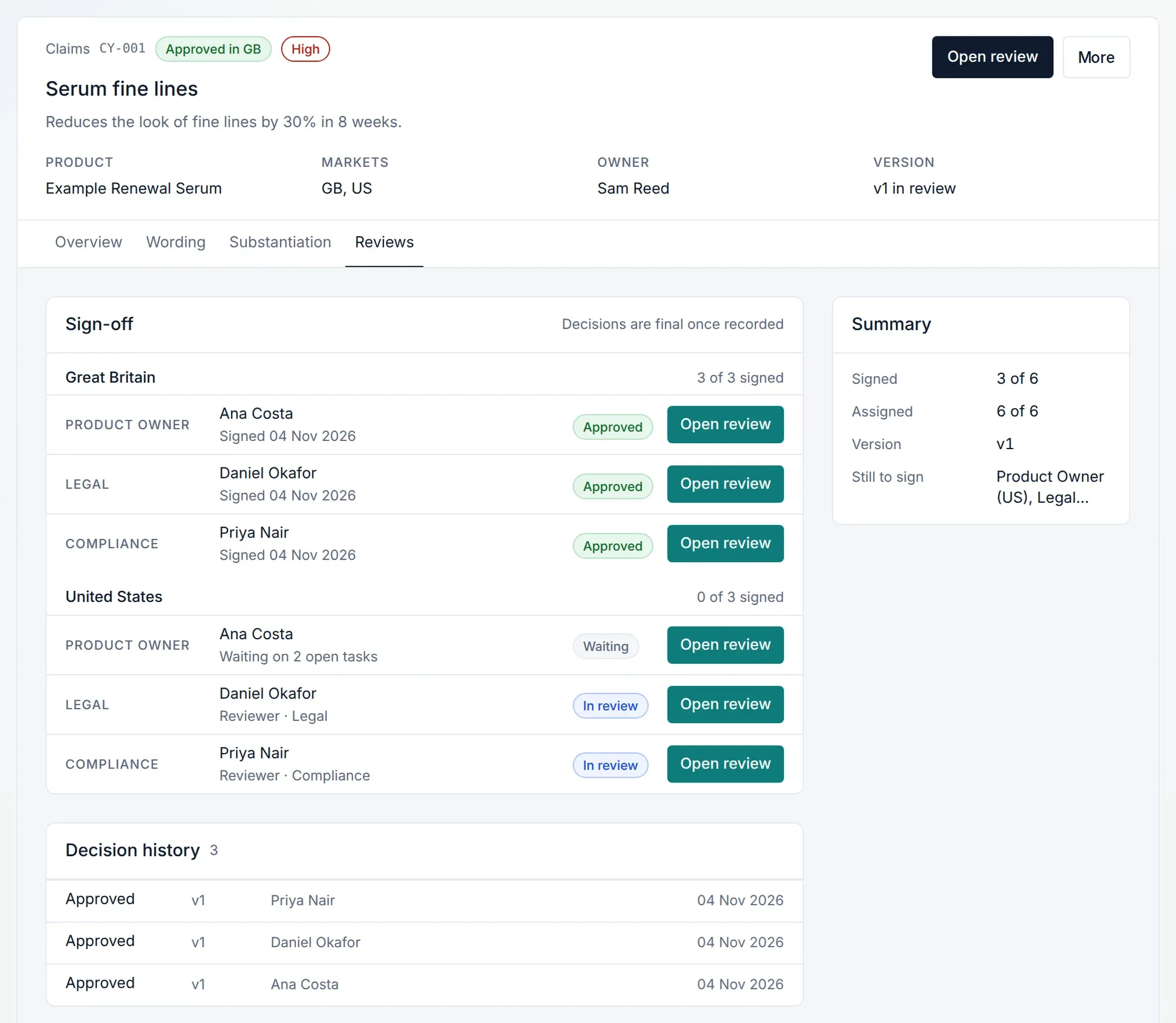
Approved claims go into your approved claims library. The Approved view lists them with their status and proof, and each claim's Wording tab shows the markets and channels it's cleared for and its conditions. Evidence expiry shows on the evidence record and as a warning. Your sales team can read it free, but can't edit it. See how a claim gets from draft to approved, or our buyer's guide to marketing compliance software if you're still comparing.
Want a bigger say in what we build? Our design partner programme gives you 30 days of free access and a direct line to Nuel.
Veridat builds a checklist of the evidence each claim needs, creates tasks for what's missing, and records who signed off, when and on which version. Try every feature free for 14 days, no card needed.
Questions
Can SharePoint or Teams handle marketing claim approvals?
They approve files and requests well, through SharePoint's content approval and the Teams Approvals app. But a SharePoint approval workflow approves a file, not each claim inside it. One record per claim, holding its wording and evidence with a sign-off per market, is something you'd build and maintain yourself.
Does Google Drive have an approval workflow?
Yes, on some Google Workspace plans (not personal Gmail accounts). You can request approval, lock the file and decide whether edits reset approvals. It approves the whole file, so approving a claims register signs off every row at once.
Is Notion good enough for a claims register?
For a small team, a Notion claims register with links to evidence, plus page lock and row-level access, is a sensible start. The Notion approval workflow is yours to design: a status property, who's allowed to change it, and where each decision and its evidence are noted.
What happens to our existing spreadsheet when we switch?
Clean it first, then import your live and planned claims by CSV and reattach the evidence to each one. Keep the old file as a view-only archive of retired claims and past decisions.
Is a spreadsheet ever enough for a claims register?
Yes, for a handful of claims in one market with one reviewer. Label versions clearly, keep an evidence link on each row and note who approved what. Add markets or reviewers and the record gets harder to keep honest by hand.
How much does claims software cost compared with a spreadsheet?
Veridat's Essentials plan is £149 a month, or £1,490 a year, for up to 3 users and 250 claims, with viewers free and unlimited. You can try every feature free for 14 days, no card needed.
This is general information, not legal advice.
Spotted something out of date? Drop us a line and we'll put it right within five working days.